

What Prediction Markets on ApeX Omni Actually Are
ApeX Omni Prediction Market is a spot trading product. You take positions on real-world event outcomes, with no leverage and no liquidation risk attached.
This is different from prediction perpetuals. Spot prediction markets settle on event resolution. They remove the complexity of margin management entirely.
The mechanics are clean. ApeX Omni integrates Polymarket order books directly into the ApeX interface. Positions are funded from your Omni account and settled in Polymarket USD, known as PUSD.
Phase 1 covers football and World Cup events only. Additional prediction categories will follow in later phases.
Why Permissionless Access Changes the Game
ApeX Omni provides permissionless access to prediction markets. No identity verification is required, so anyone can participate freely.
This is the part that matters most. Polymarket is restricted or banned in many regions. The ApeX integration removes that barrier without removing the liquidity.
You also get a one-stop trading experience. Prediction markets sit natively alongside Perpetuals, Spot, and RWA assets, all on a single platform. That improves capital efficiency and keeps your activity inside one ecosystem.
Cross-chain compatibility rounds it out. You can deposit from and withdraw to any supported chain, with no manual bridging required beforehand. The Swap and Deposit feature lets you swap any supported token to USDT during deposit, so onboarding stays seamless.
How Order Books and Liquidity Work
Order books and liquidity come directly from Polymarket's L1 markets. You get deep, established liquidity without needing to interact with Polymarket natively.
Positions are spot-based, never leveraged. That means no liquidation risk. Prediction markets become a lower-risk environment compared to perpetual trading.
Funds move between ApeX Omni and Polymarket on the Arbitrum network. Transfers typically settle within one minute.
Event-Based Hedging Opens a New Dimension for Perp Traders
Prediction markets give active traders a fresh tool for risk management. Events with direct price implications can hedge open perpetual positions.
Consider a practical case. A trader holding a short BTC position can take the YES side of a "Will BTC exceed $100,000?" event. That becomes a low-cost hedge against an adverse move.
This builds a natural bridge between directional trading and event-based outcomes. It is the kind of strategy that only becomes possible when both products live under one roof.
How To Access Prediction Market on ApeX Omni
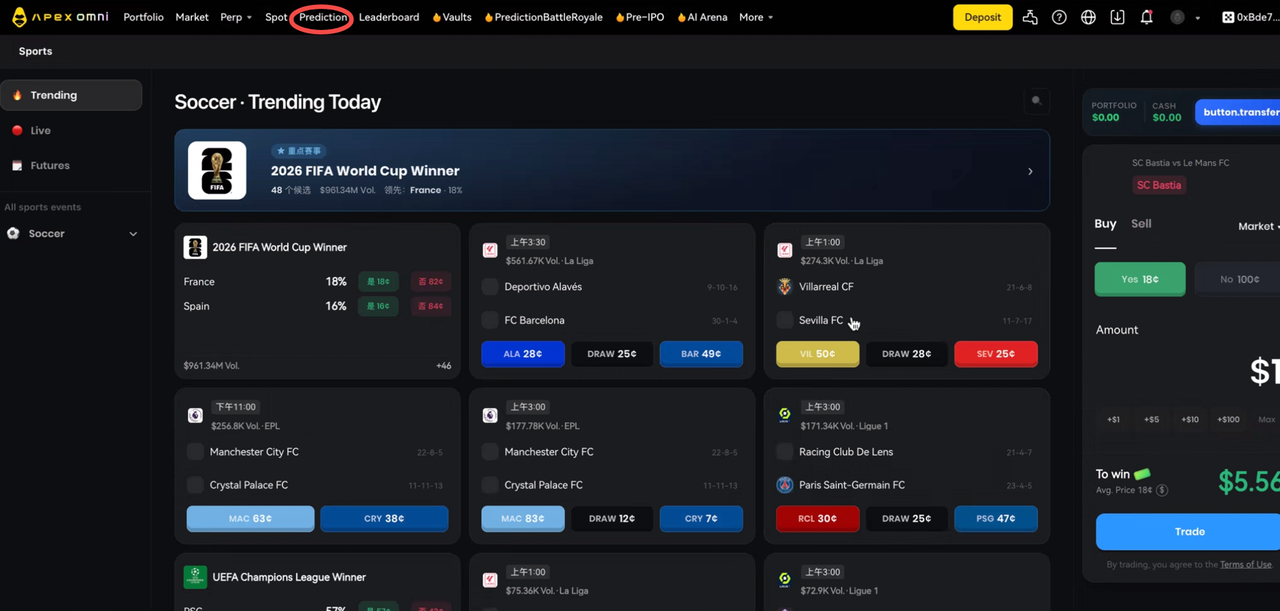
You can open Prediction Market from two locations on Web. The first is the top navigation bar, where you click "Prediction" in the main nav. The second is the Portfolio page, where you open the Prediction entry from the Portfolio view.
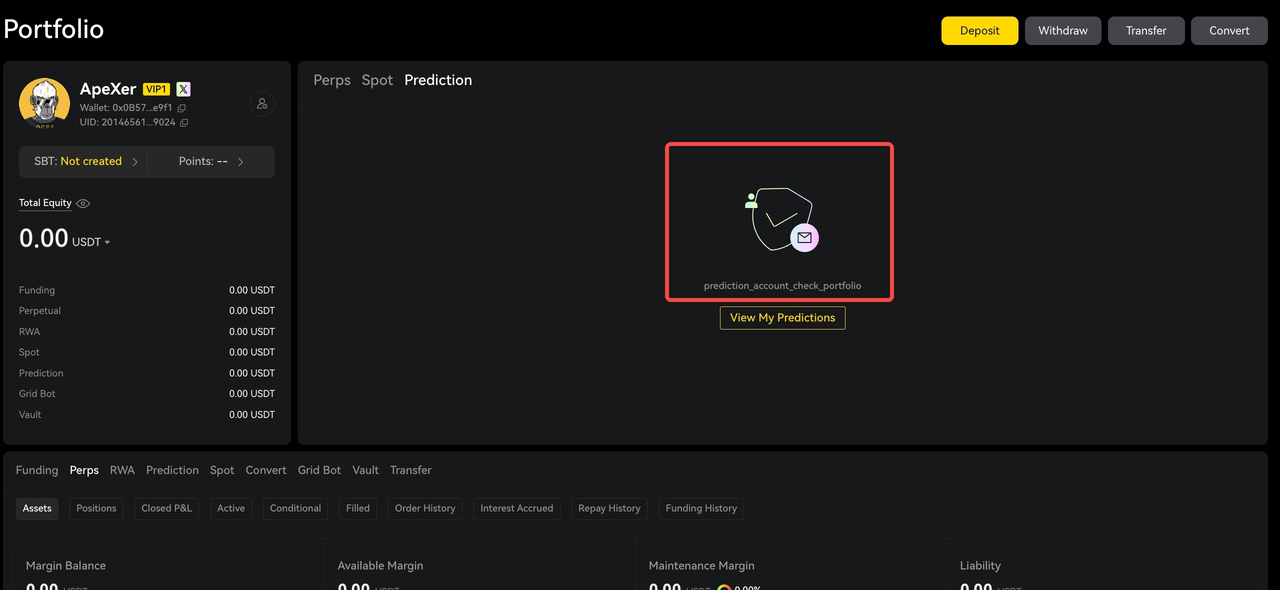
First-Time Setup Requires Wallet Signatures
Entering Prediction Market for the first time requires wallet signatures. These deploy an L1 Polymarket Gnosis Safe wallet and connect it to ApeX.
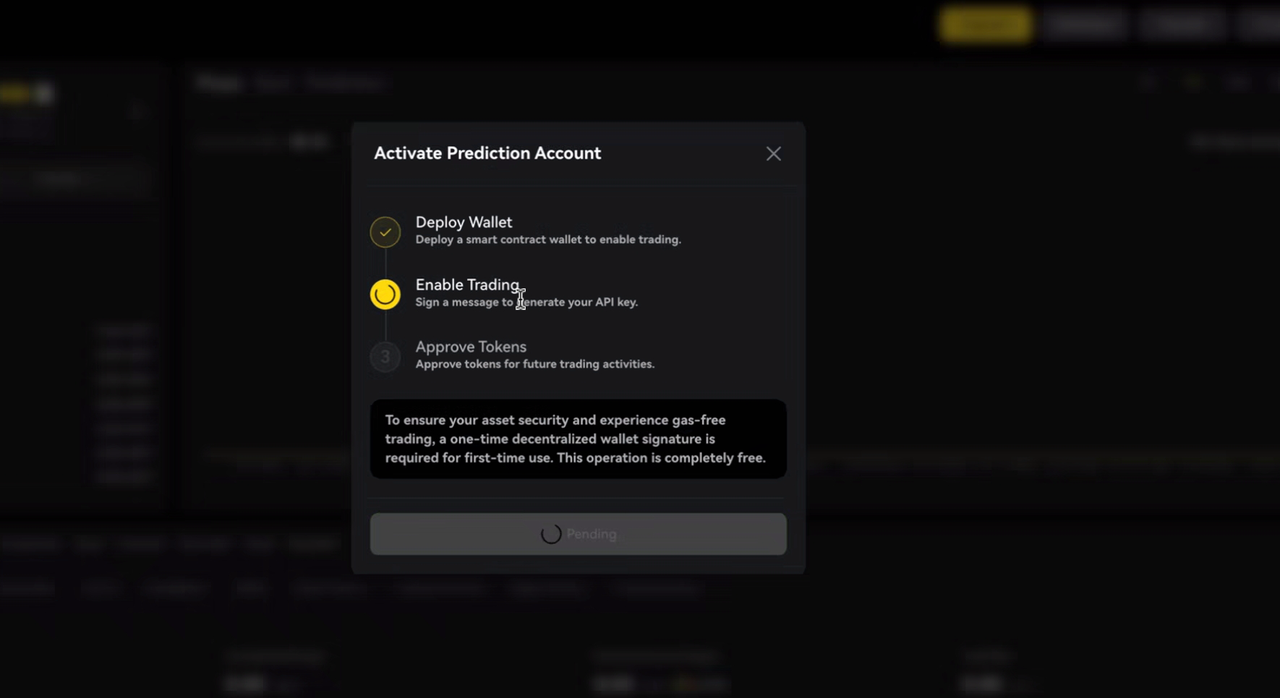
The number of signatures depends on your history with Polymarket:
New Polymarket users complete all 3 wallet signatures to deploy the Gnosis Safe and create the API key.
Existing Polymarket users need only 1 signature, to create the API key. Your existing account, balances, and positions sync to ApeX after signing.
Returning users need no further signatures after the initial setup.
Users who logged into the App by scanning a QR code from Web must complete the prediction signature through the mobile wallet app.
One important note: you must complete all required signatures before you can enter the Prediction page or view available markets. Preview mode is not supported.
How Fund Transfers Work
The asset value in your Prediction Account is included in Total Equity. Because Polymarket settles in PUSD while ApeX uses USDT, exchange rate differences between the two may cause your Total Equity balance to fluctuate continuously.
ApeX Omni integrates Polymarket services, so the "Transfer" function effectively moves your Omni funds to your L1 Polymarket balance.
A few rules apply as a result:
Fast Withdrawal is used by default.
Only the Arbitrum network is supported, and the Arb chain is selected by default and cannot be changed.
The minimum transfer amount is 3 USDT, with no maximum limit.
Transfers typically complete within one minute.
A Fast Withdrawal fee is charged when transferring from the Funding Account to the Prediction Account. No additional fee is charged when transferring back from the Prediction Account to the Funding Account.
Since the transfer is essentially an L2 to L1 transaction, you must complete signature verification the first time you perform it. And if you deposit funds directly into your Polymarket account, those funds will also appear in your ApeX Prediction Account and can be used for trading on ApeX.
Order Types and Execution
You have two order types available. Market orders let you place orders immediately at the current market price. Limit orders let you set a purchase price and an order expiration time.
Limit orders follow clear rules. If the order is not filled before expiration, it is automatically canceled. If the order remains completely unfilled or is fully canceled, all associated fees are refunded.
Signature requirements depend on how you logged in. Wallet users must complete one signature authorization for each prediction order, with no gas fee charged. Email users on Privy Wallet must click "Sign" each time before an order can be submitted.
Understanding the Trading Fees
The total trading fee has two components: the ApeX Omni fee, also called the builder fee, and the Polymarket fee.
The ApeX Omni fee is a 1% taker fee and a 0.5% maker fee. The Polymarket fee is determined by Polymarket, where makers pay no fees and takers are charged a dynamic fee that varies by market.
Fees are not deducted from your balance directly. They come out of the order value. For example, if you sell 100 shares to receive 100 PUSD, you will actually receive 99.4 PUSD after fees.
How Fees Are Displayed and Charged
When you place an order, the Polymarket fee and the ApeX fee are combined and shown as a single "Trading Fee."
A few principles govern how charges work:
Fees are only charged when opening a position. No fees are charged at event settlement.
If you buy "Yes" and later buy "No" for the same event, two separate fees are charged. The "No" position does not hedge or offset the existing "Yes" position.
Unfilled orders are not charged any fees.
Partially filled orders are charged only on the matched amount.
Fees collected by ApeX are also eligible for affiliate commission rebates. If an affiliate's Prediction Commission rate is 20% and their direct client generates 100 USDT in trading fees, the affiliate earns 20 USDT in commission.
A Note on PUSD and USDT
Polymarket uses PUSD as its trading unit. ApeX uses USDT. Fund transfers between the two go through the official bridge, which may result in conversion slippage.
You will see your asset balance in PUSD within the ApeX Prediction section. The total asset value on the ApeX Omni Portfolio page is displayed in USDT. Any discrepancy between these values comes down to the PUSD/USDT exchange rate.
Your Prediction, Your Terms
Prediction markets on ApeX Omni put real-world events at your fingertips, with permissionless access, deep Polymarket liquidity, and no liquidation risk. Whether you are hedging an open perpetual position or taking a clean directional view on the next big match, the tools now live in one place.
Want to dive deeper? Full details can be found in our GitBook docs: https://apex-pro.gitbook.io/apex-pro/apex-omni/prediction-market
Your prediction. Your terms. Trade it on ApeX Omni.